6 Best Thermostats Without a C-Wire (October 2026)
The best thermostats that work without a C-wire include the ecobee Smart Thermostat Premium for rooms with uneven temperatures, the Sensi ST55 Smart Thermostat for households preferring buttons, and the ecobee Smart Thermostat Enhanced for busy household routines.
On this page (8 sections)
- How we chose the best thermostats without a C-wire
- Which no-C-wire thermostat fits your setup?
- What should you check before buying a thermostat without a C-wire?
- Can a C-wire adapter solve a power issue?
- How should you prepare for a no-C-wire thermostat installation?
- Which mistakes cause trouble with no-C-wire upgrades?
- How do you keep the thermostat useful after installation?
- Which is the best thermostat without a C-wire for your home?
The ecobee Smart Thermostat Premium is our pick for the best thermostat without a C-wire when your HVAC system supports its included Power Extender Kit. Its included room sensor makes it especially useful when the hallway temperature differs from the rooms you use.
Choose Sensi ST55 if familiar buttons matter most, or Honeywell X2P if you want battery-powered scheduling. Start with system compatibility, then choose the controls and comfort features you'll use.
A missing common wire does not mean you must give up smart controls. It does mean you need to know how the new thermostat will receive power before removing the old one.
Start with our C-wire guide for the basics. For the different power approaches, see how smart thermostats work without a C-wire.
Our picks at a glance
-
1
 Best for rooms with uneven temperatures
ecobee Smart Thermostat Premium
9.0/10 our score
See it on Amazon -
2

-
3

- 4
 Check it
Honeywell X2P Programmable Thermostat (RTH20B)
Best for predictable weekly routines - 5
 Best for Google Home householdsCheck it
 - 6
 Check it
Sensi Lite ST25 Smart Thermostat
Best for privacy-conscious app users
How we chose the best thermostats without a C-wire
We compared power arrangements, HVAC fit and daily controls to identify who each thermostat suits. Included accessories matter, but a kit is useful only when it supports your equipment and wiring.
The order reflects each model's overall features and fit for this search. A lower-ranked battery-powered model can still be the right choice for someone who wants a weekly schedule without app controls.
We also separated room comfort features from simple scheduling. A buyer managing an uneven upstairs bedroom has different needs from someone replacing a basic thermostat beside the kitchen.
| Product | Best for | Power | Room sensor | Controls | Our score |
|---|---|---|---|---|---|
| ecobee Smart Thermostat Premium | rooms with uneven temperatures | Included Power Extender Kit for compatible systems | SmartSensor included | App and built-in voice assistant | 9.0 |
| Sensi ST55 Smart Thermostat | households preferring buttons | C-wire not required in most applications | Choose for familiar local controls | Buttons, app and voice | 8.6 |
| ecobee Smart Thermostat Enhanced | busy household routines | Included Power Extender Kit for compatible systems | SmartSensors sold separately | App and compatible voice assistants | 8.5 |
| Honeywell X2P Programmable Thermostat (RTH20B) | predictable weekly routines | 2 AA batteries, sold separately | 8.4 | ||
| Google Nest Thermostat | Google Home households | Some systems need a C-wire or compatible accessory | 7.8 | ||
| Sensi Lite ST25 Smart Thermostat | privacy-conscious app users | Some systems need a C-wire or compatible accessory | 7.3 |
Which no-C-wire thermostat fits your setup?
Choose an ecobee for a compatible power-kit installation, Sensi for its app features and control choices, or Honeywell for battery-powered scheduling. Nest belongs on your shortlist if Google Home is your preferred place to manage temperature.
ecobee Smart Thermostat Premium
- Included Power Extender Kit
- Included SmartSensor
- Radar occupancy sensing
- Air quality monitor
Choose Premium when you want a room sensor from the start and your HVAC system supports the included power kit. It offers more comfort features than a basic scheduling thermostat.
Pros
- Power kit and room sensor included
- Occupancy-based temperature adjustments
- Air quality alerts and filter reminders
Cons
- Power kit requires compatible HVAC wiring
- Siri requires an Apple home hub
The ecobee Smart Thermostat Premium suits a home where the thermostat's location does not reflect the rooms people occupy. Its SmartSensor gives the system another room reading and helps prioritize occupied spaces.
That is useful when the hallway feels comfortable while your home office feels too cool. A room sensor changes the information used for temperature control; it cannot add separate airflow control to each room.
The built-in radar sensor supports occupancy-based adjustments. An air quality monitor adds alerts and filter reminders, making Premium a fit for buyers who want several home-monitoring functions on the wall.
The included Power Extender Kit provides a route for supported homes with no common wire at the thermostat. Check the exact wiring through ecobee's compatibility checker, rather than relying on its broad compatibility claim.
Skip Premium if you want only a fixed schedule or will not use a room sensor. Its built-in Siri option also requires an Apple home hub, so check that requirement before making voice control a deciding feature.
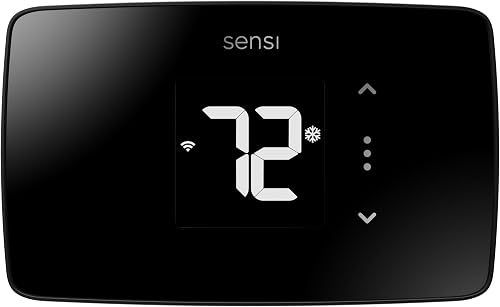
Sensi ST55 Smart Thermostat
- No C-wire in most applications
- Physical button controls
- App-guided installation
- Usage reports
ST55 suits households that want familiar wall controls alongside remote access. Confirm its power requirements for your exact system before planning a no-C-wire installation.
Pros
- Familiar button layout
- Built-in level and wire labels
- Scheduling and equipment reminders
Cons
- No-C-wire support depends on the application
- System compatibility needs confirmation
The Sensi ST55 Smart Thermostat is the strongest match here for households that prefer physical buttons. It lets someone adjust the wall unit while another household member handles schedules through the app.
Flexible scheduling, remote access and usage reports make it more useful than a basic replacement. Equipment alerts and filter reminders can also help you keep track of routine care without remembering every date.
Sensi says a common wire is not required in most applications. Confirm the exact model and system combination, because that wording is not a blanket promise for every installation.
The built-in level and step-by-step app instructions help with mounting and setup. Its traditional shape may also suit a replacement project where covering the old wall footprint matters, though you should measure before ordering.
Choose ST55 when wall controls matter as much as phone access, and skip it if your intended wiring arrangement is unsupported. For broader context, compare the Sensi Lite ST25 Smart Thermostat with other Wi-Fi options.
ecobee Smart Thermostat Enhanced
- Included Power Extender Kit
- Occupancy sensing
- Remote app control
- SmartSensors available separately
Enhanced suits buyers who want occupancy-based adjustments and an included power kit without starting with a separate room sensor. Confirm the kit works with your equipment.
Pros
- Power kit included
- Automatic away and sleep adjustments
- Works with several smart-home systems
Cons
- Room sensors cost extra
- Power kit requires compatible HVAC wiring
The ecobee Smart Thermostat Enhanced suits households that want automatic adjustments around home and away routines. It combines occupancy sensing with app access, without including a separate room sensor.
That makes it a sensible starting point if the thermostat sits in a representative part of your home. You can consider SmartSensors later if a bedroom or office needs more attention; they are sold separately.
Enhanced adjusts around away and sleep periods and accounts for humidity in its comfort settings. It also works with Alexa, Google Assistant, Apple HomeKit and SmartThings for buyers who already use those systems.
Its included Power Extender Kit still needs a compatible HVAC arrangement. Our ecobee Power Extender Kit guide explains why installation may involve the equipment end of the thermostat cable.
Choose Enhanced if routine-based control is your main goal. Skip it in favor of Premium when you already know you want a room sensor, and compare the complete package rather than the thermostat alone.
Honeywell X2P Programmable Thermostat (RTH20B)
- Battery powered; no C-wire required
- 5-2 day scheduling
- Backlit display
- Single-stage system support
X2P is the direct choice for battery-powered scheduling on supported single-stage systems. Skip it for multi-stage equipment or 120–240 V electric baseboard heat.
Pros
- No C-wire required
- Separate weekday and weekend schedules
- Non-programmable option
Cons
- Does not support multi-stage systems
- Not for 120–240 V electric baseboard heat
The Honeywell X2P Programmable Thermostat (RTH20B) is the clearest choice here for a regular weekly routine without smart-home management. Its 5-2 schedule lets you set one weekday pattern and a separate weekend pattern.
It runs on 2 AA batteries, sold separately, so no C-wire is required. You can also choose a non-programmable mode if someone is usually home and a fixed temperature suits the household.
The backlit display and clear font support everyday wall use. Optional filter reminders add a useful prompt, though the right replacement interval still depends on your filter and HVAC instructions.
Buy it only for supported single-stage equipment, including compatible single-stage heat pumps. It does not support multi-stage systems or 120–240 V electric baseboard heat.
Skip it if remote changes are central to your plan, or if your weekday routine changes often. Buyers who mainly want reliable scheduling can compare more options in our best programmable thermostats guide.
Google Nest Thermostat
- No C-wire in most homes
- Google Home scheduling
- Remote temperature changes
- HVAC alerts
Choose Nest if you want to manage schedules through Google Home and have a confirmed power arrangement. Its general no-C-wire support has important system exceptions.
Pros
- Google Home app control
- Automatic away adjustments
- Schedule suggestions through Savings Finder
Cons
- Several system types may need extra power support
- Remote access requires internet and Wi-Fi
The Google Nest Thermostat suits buyers who want scheduling within Google Home. It allows remote temperature changes, turns down when you leave and offers schedule suggestions through Savings Finder.
Those features fit someone who wants to adjust a schedule from a phone instead of programming every change at the wall. Remote access requires working internet and Wi-Fi.
Its no-C-wire design has specific exceptions. Some heating-only, cooling-only, zone-controlled and heat pump systems need a common wire or another compatible power accessory.
Resolve that power question before choosing Nest for its app. The included batteries do not establish that every system can run it without additional power support.
HVAC alerts can flag a possible issue, but they do not replace a professional diagnosis. Skip Nest if its supported power route does not suit your installation, and use our best smart thermostats guide to compare other wiring-first choices.
Sensi Lite ST25 Smart Thermostat
- No C-wire in most homes
- Scheduling and geofencing
- Remote access
- Thermostat activity privacy policy
Sensi Lite suits buyers who want app scheduling with Sensi's stated privacy protections. Check the system exceptions and your Wi-Fi setup before choosing it.
Pros
- Remote access and usage reports
- Built-in level
- Sensi says activity data is not used for targeted advertising
Cons
- Some systems need added power support
- Requires a 2.4 GHz Wi-Fi connection for setup
The Sensi Lite ST25 Smart Thermostat suits buyers who want app scheduling with clear privacy commitments. Sensi says it will not sell personal information or use thermostat activity data for targeted advertising.
Flexible scheduling, geofencing and remote access fit someone whose arrival time varies. Usage reports provide another way to review how often the HVAC system runs and decide whether a schedule needs adjustment.
Sensi Lite needs a 2.4 GHz Wi-Fi connection for setup. Check your network settings before installation, especially if you are unfamiliar with how your router presents its wireless networks.
Some heating-only, cooling-only and heat pump systems need a C-wire or compatible power accessory. Do not transfer wiring assumptions from ST55 to Lite simply because both carry the Sensi name.
Choose Lite when its privacy policy and app features suit you, and the system check confirms a workable power route. For a heat pump, our heat pump thermostat guide covers equipment checks beyond power.
What should you check before buying a thermostat without a C-wire?
Check equipment type, terminal labels and the approved power method before comparing convenience features. A thermostat can support your heating system yet still require a different power arrangement from your old unit.
Choosing the best thermostat without a C-wire starts with terminal labels
Record the letters beside the connected wires, rather than identifying wires by color. Installers can use different colors, and the terminal tells you what each connected wire does.
Turn off power to the HVAC equipment before removing the thermostat face or inspecting connections. Take a clear photo that shows the terminal labels and any existing jumpers before moving anything.
An unused wire tucked behind the wall plate may offer another option. It becomes a usable common wire only after the correct connection is confirmed at both ends.
Do not connect a spare wire based on color or guess at a terminal. Our thermostat compatibility checker guide outlines the details to gather before selecting a model.
Match the heating stages and equipment type
Confirm whether you have a furnace and air conditioner, a heat pump, hot water heat or another setup. Next, identify the number of heating and cooling stages and any auxiliary heat.
A single-stage thermostat cannot control every function of multi-stage equipment. With a heat pump, support for the reversing valve and backup heat matters just as much as the power supply.
Zoned systems need extra care because a zone controller may sit between the thermostat and the HVAC equipment. Compatibility guidance must cover that arrangement, not just the furnace model.
Decide how you want to make daily changes
Choose wall controls that everyone in the home can use comfortably. App access helps with travel and changing routines, but it should complement a sensible daily schedule.
If your workweek is predictable, separate weekday and weekend programming may be enough. If arrivals vary, remote access or supported occupancy features can be more useful than adding more fixed schedule periods.
A room sensor is worth considering when the thermostat sits away from the space you care about most. It will not correct blocked vents, poor airflow or an HVAC system that cannot maintain the desired temperature.
Can a C-wire adapter solve a power issue?
A compatible power kit can solve some missing-wire problems, but it cannot correct an incompatible thermostat choice. Check approval for the exact thermostat, HVAC equipment and wiring arrangement before buying an accessory.
Some kits require connections at the furnace or air handler. That can be a manageable job with clearly labeled terminals, but it adds work beyond replacing the wall unit.
Check access before ordering. A locked equipment room, cramped attic location or unclear control board can make a professional installation the more practical route.
Do not assume different brands' adapters are interchangeable. Use the installation method approved for the thermostat, and avoid combining power accessories unless the manufacturer specifically instructs you to do so.
Running a new thermostat cable may also be an option when the route is accessible. Compare that work with a kit installation, especially if the existing cable is damaged or has too few conductors for the controls you need.
How should you prepare for a no-C-wire thermostat installation?
Prepare by documenting the old connections and confirming the new wiring plan before disconnecting anything. Allow enough time to resolve setup questions while help is available.
- Confirm the model. Check the exact thermostat model against the brand's compatibility guidance, including any required accessory.
- Gather the basics. Have the instructions, wire labels, mounting tools and any required batteries ready.
- Check equipment access. If the plan includes a power kit, locate the furnace or air-handler connections before starting.
- Shut off HVAC power. Use the appropriate breaker or service switch as directed by the installation instructions.
- Photograph and label. Record each original terminal connection and keep loose wires from slipping into the wall.
- Follow the model's wiring diagram. Do not copy a diagram for a similar thermostat or move old jumpers automatically.
Do not proceed with an ordinary low-voltage thermostat replacement if you find high-voltage markings or wiring you cannot identify. Have a qualified HVAC professional determine the proper control.
After mounting, configure the equipment type and heating stages carefully. A correct wire connection paired with the wrong setup choice can still produce the wrong heating or cooling behavior.
Follow the thermostat's startup checks for each supported operating mode. Avoid rapid mode changes, and respect any equipment delay shown in the instructions.
For a Wi-Fi model, finish account setup and confirm remote control before relying on it while away. Then make sure household members know how to adjust the temperature at the wall.
Which mistakes cause trouble with no-C-wire upgrades?
The biggest mistake is treating “no C-wire required” as universal compatibility. Power, equipment controls and installation access are separate checks.
Do not copy the old thermostat's power assumptions. A simple battery-powered model and a Wi-Fi model can place different demands on the same HVAC wiring.
Do not treat included batteries as proof of battery-only operation. The thermostat's instructions determine their role and whether the system needs another power source.
Do not buy for your voice assistant first. Smart-home support matters only after the thermostat can safely power and control the equipment.
Do not assume a room sensor creates zoning. Prioritizing a bedroom reading can change the rest of the home's temperature because the same equipment may still serve all rooms together.
Do not overlook the old wall footprint. Measure exposed paint marks and mounting space before removing the existing plate, then check whether the replacement or included trim will cover them.
Do not start with an aggressive schedule. Begin with comfortable settings, then change one period at a time so you can tell which adjustment helps.
How do you keep the thermostat useful after installation?
Keep schedules, sensors and power supplies in good order so the thermostat matches how you live. A successful installation is only the start of getting useful temperature control.
For a battery-powered model, follow the battery guidance and respond promptly to low-battery messages. Use the specified battery type, and check the display before leaving the home unattended for an extended period.
Keep room sensors in representative locations. Direct sun, supply vents and nearby heat sources can skew the reading and make the thermostat respond to conditions that do not reflect the room.
Review schedules after a job change, school break or shift in who stays home. Repeated manual overrides usually mean the programmed routine needs attention.
With geofencing or occupancy settings, check that the household's setup does not treat the home as empty while someone is still there. Start with modest temperature changes and review comfort before widening the gap.
Use filter reminders as prompts to inspect and follow the filter manufacturer's guidance. A thermostat reminder does not measure every condition that affects how quickly a filter becomes dirty.
Persistent restarts, blank screens or unexpected HVAC behavior deserve attention. Check the approved power arrangement and seek qualified help rather than repeatedly resetting the thermostat.
Energy savings depend on the schedule, weather, equipment and previous settings. Our guide to whether a smart thermostat saves money explains how useful control changes affect the result.
Which is the best thermostat without a C-wire for your home?
Choose the best thermostat without a C-wire by eliminating unsupported power arrangements first. Then decide whether you need a room sensor, automatic routine changes, familiar buttons or basic scheduling.
Pick ecobee Premium when an included room sensor solves a real comfort need. Choose Enhanced when you want occupancy-based control and prefer to decide about extra room sensors later.
Choose Sensi ST55 for a household that values physical buttons alongside app access. Choose Honeywell X2P for supported single-stage equipment and a predictable weekday/weekend routine.
Pick Google Nest if Google Home scheduling is your preference and its power check is clear. Choose Sensi Lite when its app features and privacy commitments match your priorities.
Before ordering, write down the exact power method your chosen model will use. If that answer still depends on an accessory, use our C-wire adapter guide to settle the installation plan.
Our top 3 picks at a glance
-
1
Best for rooms with uneven temperatures
ecobee Smart Thermostat Premium
9.0/10 our score
See it on Amazon -
2
-
3
Frequently asked questions
Can a smart thermostat work without a C-wire?
Yes, a smart thermostat can work without a C-wire when its power method matches your HVAC system; some models support certain systems directly, while others use a compatible power kit. An old battery-powered thermostat does not prove a new smart model will work with the same wires.
What does a C-wire do?
A C-wire completes the low-voltage circuit that supplies steady power to a thermostat; it is not the same as a household neutral or ground wire. Our C-wire guide covers the basics, but your thermostat instructions determine which power arrangement is suitable for your equipment.
Is an adapter the same as a C-wire?
No, an adapter provides an alternative power arrangement for a supported thermostat and HVAC system; it does not make every thermostat compatible with every furnace or air handler. Our guide to C-wire adapters explains the checks to make before buying a kit or changing connections.
Can I install a thermostat without a C-wire myself?
You can install some models yourself if you can identify the equipment, follow the wiring instructions and safely access every required connection; a power kit may add work at the furnace or air handler. Turn off HVAC power first, and hire a qualified professional if the wiring is unclear.
Do heat pumps need a C-wire?
Some heat pump systems need a C-wire or compatible power accessory with the thermostat you choose; also confirm support for the reversing valve, heating stages and any auxiliary heat. Our heat pump thermostat guide explains why a power match alone does not establish full system compatibility.