7 Best Wi-Fi Thermostats for the Home (October 2026)
The best Best Wi-Fi thermostats for home include the Sensi ST55 Smart Thermostat for button-control households, the ecobee Smart Thermostat Enhanced for changing routines, and the ecobee Smart Thermostat Essential for steady routines.
On this page (9 sections)
- How we chose the best Wi-Fi thermostats
- Wi-Fi thermostat features at a glance
- Which Wi-Fi thermostat fits your household?
- What must match before you buy a Wi-Fi thermostat?
- Do you need room sensors or occupancy features?
- How should you set up a Wi-Fi thermostat?
- How do you build a schedule that saves energy?
- What care and common mistakes matter after installation?
- Which best Wi-Fi thermostat should you choose?
The best Wi-Fi thermostat for most homes is the Sensi ST55 Smart Thermostat because it pairs familiar buttons with app access and flexible schedules. Choose ecobee Enhanced if you want built-in occupancy sensing, or Google Nest Thermostat if you prefer managing temperature through Google Home.
Buy for your HVAC system first, then your routine. The right app cannot make an incompatible thermostat control your equipment, and automatic away settings help only when they match how your household lives.
Start with our wiring-first smart thermostat guide for the broader comparison. If power is your main concern, read whether you need a C-wire for a smart thermostat before choosing a model.
Our picks at a glance
-
1

-
2

-
3

- 4
 Best for Google Home usersCheck it
 - 5
 Check it
Honeywell Home T5 Smart Thermostat
Best for phone-based arrivals - 6
 Best for Alexa householdsCheck it
 - 7
 Check it
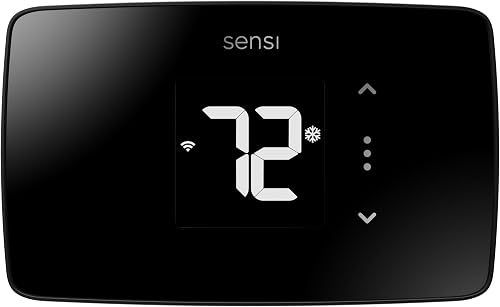
Sensi Lite ST25 Smart Thermostat
Best for privacy-minded app users
How we chose the best Wi-Fi thermostats
We compared wiring requirements, everyday controls, schedules and useful automation to identify who each thermostat suits. Familiar wall controls put the Sensi ST55 first, while ecobee Enhanced is the stronger choice for occupancy-based adjustments.
The order is a starting point, not a reason to buy features you won't use. A household with fixed hours may get more use from a clear schedule than from several automatic routines.
We also considered installation extras and smart home support. A separate power accessory, room sensor or trim kit can change which model makes sense for your home.
Wi-Fi thermostat features at a glance
Use the table to narrow your choice by power needs, controls and smart home support. Then confirm the exact equipment match before comparing convenience features.
| Product | Best for | Wiring | Controls | Smart home | Our score |
|---|---|---|---|---|---|
| Sensi ST55 Smart Thermostat | button-control households | C-wire not required in most applications | Buttons, app and voice | Alexa, Apple HomeKit, Google Assistant, SmartThings and Vera | 8.6 |
| ecobee Smart Thermostat Enhanced | changing routines | Power Extender Kit included for compatible systems without a C-wire | App, with remote access | Alexa, Google Assistant, Apple HomeKit and SmartThings | 8.5 |
| ecobee Smart Thermostat Essential | steady routines | Power Extender Kit sold separately for compatible systems without a C-wire | Touchscreen and app | Alexa, Google Assistant and Apple HomeKit | 8.2 |
| Google Nest Thermostat | Google Home users | C-wire or compatible power accessory needed for some systems | Google Home app and voice control with compatible devices | Google Assistant, Alexa and Matter-certified voice assistants | 7.8 |
| Honeywell Home T5 Smart Thermostat | phone-based arrivals | Check compatibility and whether a C-wire power adapter is needed | Touch controls and app | Alexa, Apple HomeKit and Google Assistant | 7.7 |
| Amazon Smart Thermostat | Alexa households | Confirm system and wiring needs before buying | Alexa app; advanced automatic control with Alexa+ | Alexa and select Alexa devices | 7.5 |
| Sensi Lite ST25 Smart Thermostat | privacy-minded app users | Some heating-only, cooling-only and heat pump systems need a C-wire or compatible power accessory | App, touch and voice | Alexa, Google Assistant and SmartThings | 7.3 |
An included power accessory does not make a thermostat universal. Likewise, support for a voice assistant does not mean every automation or connected device will work with it.
Which Wi-Fi thermostat fits your household?
Choose according to who adjusts the temperature and how your routine changes. The product sections below explain the practical reason to choose each model, plus the situations where another pick fits better.
Sensi ST55 Smart Thermostat
- Physical button controls
- Flexible scheduling and usage reports
- Equipment alerts and maintenance reminders
- Broad smart home support
Familiar buttons suit households where everyone needs to adjust the wall thermostat easily. App access adds scheduling and remote changes without making a phone the only way to manage comfort.
Pros
- Physical buttons for wall adjustments
- Usage reports and maintenance reminders
- Works across several smart home systems
Cons
- No-C-wire suitability depends on the HVAC setup
- Buyers seeking built-in occupancy sensing should consider ecobee Enhanced
The Sensi ST55 is the strongest starting point for a household that wants a familiar thermostat with added phone control. Physical buttons let family members and guests make a wall adjustment without opening an app.
Its traditional shape is also useful when replacing an older thermostat. Sensi designed it to occupy the space of a traditional model, which may help avoid wall repairs, though you should compare the old footprint before removal.
Beyond schedules, equipment alerts and filter reminders give you useful prompts for routine HVAC care. Sensi also says it won't sell personal information to third parties.
Choose the ST55 if you want a straightforward daily routine: set a schedule, make occasional remote changes and keep wall controls easy to understand. Its built-in level and guided app instructions help with installation.
Skip it if built-in occupancy sensing is the main reason you're upgrading. ecobee Enhanced is the clearer fit for that job, while the ST55 favors familiar control.
ecobee Smart Thermostat Enhanced
- Built-in occupancy sensing
- Automatic away and sleep adjustments
- Power Extender Kit and trim kit included
- Optional SmartSensors sold separately
Built-in occupancy sensing suits homes where arrival times vary. The included Power Extender Kit and trim kit also matter when comparing the full installation needs with Essential.
Pros
- Responds to occupancy and routines
- Power Extender Kit and trim kit included
- Supports optional room sensors
Cons
- Room sensors cost extra
- Power Extender Kit suitability still depends on the system
ecobee Enhanced suits homes where work hours, school runs or evening plans change. Built-in occupancy sensing adds a way to respond to people being home instead of relying only on a weekly timetable.
It can adjust for away and sleep periods, learn preferences and schedules, and account for humidity. These features suit someone willing to review automatic settings and fine-tune how the home responds.
The included Power Extender Kit and trim kit deserve attention when comparing it with Essential. They can simplify the accessory list, although the power kit still needs to suit your wiring.
Optional SmartSensors let the thermostat consider occupancy and temperature beyond the hallway. They are sold separately, so plan for them only if another room needs to influence comfort.
Choose Enhanced for a more automatic routine or a future room-sensor setup. Skip it if you prefer predictable manual settings and would turn off most automatic adjustments.
ecobee Smart Thermostat Essential
- Color touchscreen and app control
- Schedule-based temperature adjustments
- Optional SmartSensor support
- Power Extender Kit and trim kit sold separately
A color touchscreen and schedule-based control suit a household with predictable home and away times. Check accessory needs before choosing it over Enhanced.
Pros
- Color touchscreen
- App scheduling and energy-use tracking
- Can work with optional ecobee SmartSensors
Cons
- Power Extender Kit and trim kit are separate
- Choose Enhanced if built-in occupancy sensing is a priority
ecobee Essential fits a home with regular hours and a preference for touchscreen scheduling. Its color screen and app give you two ways to change temperatures, while scheduled adjustments handle recurring home and away periods.
It also includes humidity detection, a schedule assistant and time-of-use features that can shift heating or cooling around electricity costs. Check your utility rate plan before deciding whether that last feature is useful.
Essential can work with optional SmartSensors if you later want another room's temperature to matter. You don't need to plan a sensor system just to benefit from basic scheduling.
The main buying trap is forgetting installation accessories. Both the Power Extender Kit and trim kit are sold separately, so compare the complete setup with Enhanced.
Choose Essential when your routine is steady and its core controls meet your needs. Choose Enhanced instead when built-in occupancy sensing and its included installation extras solve a clear problem.
Google Nest Thermostat
- Google Home scheduling and remote access
- Turns down when you leave
- Savings Finder schedule suggestions
- HVAC alerts for eligible systems
Google Home users can manage schedules, remote changes and away adjustments in a familiar app. Check power requirements closely for heat pumps and other systems that need a C-wire or accessory.
Pros
- Google Home app control
- Schedule suggestions from Savings Finder
- HVAC alerts and maintenance reminders
Cons
- Some systems need a separate power solution
- HVAC alerts cannot diagnose equipment problems
Google Nest Thermostat is a practical choice if Google Home is already your household's control app. You can build an energy-conscious schedule there and make remote changes without introducing another daily app.
Away adjustments reduce the need to remember a temperature change every time you leave. Savings Finder also suggests schedule changes, which is useful if you want help refining a routine rather than leaving the first schedule untouched.
Pay close attention to power needs for heating-only, cooling-only, zone-controlled and heat pump systems. These can require a C-wire or compatible power accessory even though the thermostat is designed to work without one in most homes.
HVAC monitoring can flag possible trouble in eligible equipment, but an alert cannot diagnose the cause. Use it as a prompt to investigate.
Choose this model for Google Home scheduling and away control. Skip it if you want built-in occupancy sensing like ecobee Enhanced or prefer the ST55's familiar physical buttons.
Honeywell Home T5 Smart Thermostat
- 7-day scheduling
- Location-based temperature control
- Auto Home and Away mode
- Monthly energy reports
Choose a weekly schedule or use your phone's location to guide home and away changes. Location-based control makes most sense when the participating phones reflect who is actually home.
Pros
- Choice of scheduling or geofencing
- Monthly energy reports and tips
- Supports several common voice assistants
Cons
- Power adapter requirements need checking
- Heating-only oil furnace systems require a C-wire
Honeywell Home T5 suits a household that wants to choose between a weekly schedule and phone-based arrivals. Its 7-day programming covers regular hours, while geofencing uses your phone's location to help manage home and away settings.
Location-based control makes the most sense when the participating phones reflect who is home. A person working from home, a child without a phone or a guest staying behind can make a simple leave-and-return routine less useful.
Monthly energy reports and personalized tips give you a reason to review settings after the initial setup. Look for unnecessary heating or cooling periods rather than changing temperatures every day.
Check the C-wire or adapter requirements before buying. Heating-only oil furnace systems require a C-wire.
Choose the T5 if phone-based control fits your household better than occupancy sensing at the wall. Skip location-based operation if phones don't reliably represent who's home, and use a schedule instead.
Amazon Smart Thermostat
- Alexa app installation guidance
- Home, away and sleep schedules
- Remote Alexa app control
- Temperature or presence input from select Alexa devices
An Alexa-centered home can keep thermostat schedules and remote adjustments in the same app as other devices. Confirm support for any Alexa device you want to use for temperature or presence input.
Pros
- Guided setup through the Alexa app
- Home, away and sleep schedules
- Works with select Alexa devices for added temperature or presence input
Cons
- Advanced automatic control uses Alexa+
- Exact wiring and HVAC compatibility need confirmation
Amazon Smart Thermostat fits a home already organized around the Alexa app. Installation guidance, remote temperature changes and home, away and sleep schedules keep those tasks in one place.
Select Alexa devices can supply temperature readings or presence information to guide adjustments. Confirm the exact supported device before assuming an Echo you already have can fill that role.
Keep basic scheduling separate from the advanced automatic controls Amazon describes with Alexa+. Decide whether you want to create your own schedule or use those advanced features before choosing your setup.
Connected temperature input can help the thermostat respond to another part of the home. It does not add ducts, dampers or separate HVAC zones.
Choose this thermostat if Alexa is your preferred control system and its supported features meet your needs. Skip it if Apple HomeKit support or a broader mix of smart home platforms is central to your plans.
Sensi Lite ST25 Smart Thermostat
- Remote app control and geofencing
- Flexible scheduling and usage reports
- Sensi privacy commitments
- Requires 2.4 GHz Wi-Fi
App-focused households get scheduling, geofencing and usage reports with Sensi's stated privacy protections. Check both HVAC power needs and your home Wi-Fi setup before choosing it.
Pros
- Scheduling, geofencing and remote access
- Usage reports
- Sensi says it does not sell personal information or use thermostat activity for targeted advertising
Cons
- Some HVAC systems need another power solution
- Requires a 2.4 GHz Wi-Fi connection
Sensi Lite ST25 suits someone who expects to manage comfort mainly through a phone. Scheduling, geofencing and usage reports cover useful daily tasks without requiring a room-sensor plan.
Its privacy commitments are another reason to consider it. Sensi says it won't sell personal information or use thermostat activity data for targeted advertising, though app control still involves a connected service.
Confirm that you can provide a 2.4 GHz Wi-Fi connection at the thermostat. A network name alone doesn't tell you which band your router makes available.
Power also needs a system-specific check, particularly for heating-only, cooling-only and heat pump equipment. Our smart thermostat checks for heat pumps explain the equipment details to gather.
Choose Lite for app-based control and Sensi's stated privacy approach. Skip it if you need Apple HomeKit or Vera support, both of which are supported by the ST55 in this comparison.
What must match before you buy a Wi-Fi thermostat?
Your HVAC type, wiring and power arrangement must match the thermostat. Gather those details before deciding which screen, app or automatic feature you prefer.
How do you check the best Wi-Fi thermostat for your wiring?
Start with the terminal labels on your current thermostat and the model details of your heating and cooling equipment. Wire colors are not enough, because installers do not always use the same color for the same job.
A C-wire provides a common connection for continuous low-voltage power. A spare wire behind the wall may help, but it must be correctly connected at the equipment end before it can serve that purpose.
Use the C-wire guide to understand the wiring question and the ecobee Power Extender Kit guide for that specific accessory. Our explanation of what a C-wire adapter does can help you distinguish an adapter from an existing common wire.
Don't treat included batteries as proof that a thermostat needs no other power connection. Follow the exact model's installation instructions and compatibility result.
What changes with a heat pump or multiple stages?
Confirm heating stages, cooling stages and backup heat, not just whether the thermostat supports heat pumps. A match for a simple system may not cover equipment with extra stages or dual-fuel controls.
Our heat pump thermostat guide explains what to identify. If the current wiring includes unfamiliar terminals or a separate equipment control module, ask the manufacturer or an HVAC professional to confirm the match.
Zoned systems also deserve a closer check because a thermostat may connect through a zone-control panel. Record the panel model rather than assuming the furnace model answers every compatibility question.
Which app and household controls matter?
Choose controls that everyone in the home can use, including people who won't install an app. Decide who needs remote access and who simply needs to change the wall temperature.
Check the exact voice assistant connection you want before buying. Thermostat support for an ecosystem does not automatically include every routine, sensor or voice feature within that ecosystem.
For phone-based away control, think through shared schedules and permissions. The person with the main account should not be the only person who knows how to restore a comfortable setting.
Do you need room sensors or occupancy features?
Choose room sensors when another room should guide temperature decisions, and occupancy features when your home and away routine varies. They solve different problems, even when a sensor can report both temperature and movement.
A hallway thermostat measures conditions near the hallway. If the bedroom is warmer at night, using a reading from that room can give the system a more relevant target.
A sensor cannot repair poor airflow, insulation gaps or an undersized HVAC system. Making one room comfortable may also make another room warmer or cooler because the same equipment serves both.
For a planned sensor setup, compare thermostats with remote room sensors. Check where you would place a sensor before choosing a thermostat around that feature.
Keep sensors away from direct sun, supply vents and heat-producing electronics. A reading near a lamp or sunny window can lead to adjustments that don't reflect the occupied part of the room.
How should you set up a Wi-Fi thermostat?
Set it up in this order: confirm compatibility, connect it safely, enter equipment settings, then add schedules and automation. This makes it easier to spot a problem before several automatic rules are involved.
Before disconnecting anything, turn off power to the HVAC equipment at the appropriate breaker or disconnect. Photograph the original terminal connections and label each wire by its terminal.
Do not connect a low-voltage thermostat to line-voltage wiring. If you find heavy wires, wire nuts, unfamiliar controls or an uncertain voltage, stop and get qualified help.
Follow the model's instructions for mounting, wire connections and equipment configuration. Entering the wrong system type or reversing-valve setting can cause incorrect operation even when the wires fit.
Once power is restored, verify normal heating, cooling and fan operation as applicable. Respect the equipment's built-in delays rather than switching modes repeatedly to force an immediate response.
Connect the app and check that remote commands reach the thermostat. Then add voice control, room sensors or location routines one feature at a time.
Check Wi-Fi signal where the thermostat sits, especially if the router is on another floor. Confirm the model's network requirements instead of assuming every thermostat supports the same bands or security settings.
Finish by showing the household how to change temperature and cancel a temporary override. Keep installation photos and equipment details somewhere you can find them later.
How do you build a schedule that saves energy?
Start with your real home, away and sleep periods, then use modest changes you can live with. A schedule that causes discomfort will soon be replaced by a permanent hold.
If someone works from home only on certain days, program those days separately where the controls allow it. Include a plan for weekends and visitors instead of treating every day as an empty-house workday.
Give the home time to reach a comfortable temperature before a regular return. Setting an extreme target does not make most conventional systems heat or cool faster.
For heat pumps, discuss large temperature setbacks with your installer because recovery can involve backup heat. The best schedule depends on the equipment and climate, not a single rule for every home.
Review automatic away settings before enabling several routines. A thermostat schedule, phone geofencing and a smart home routine can otherwise send competing instructions.
If you're on a time-of-use electricity plan, check the actual peak periods before using related features. Lower energy use and lower cost are different goals when the rate changes by time of day.
Judge results over comparable weather and occupancy periods. A colder month or more time at home can increase use even when your schedule is sensible.
What care and common mistakes matter after installation?
Keep the thermostat clean, uncovered and free from conflicting settings. Most ongoing attention belongs to the schedule, connection and HVAC maintenance rather than the thermostat itself.
Wipe the exterior as directed in its manual, and avoid spraying cleaner into openings. Keep furniture, curtains and nearby heat sources from affecting the temperature reading.
For models that use replaceable batteries, follow the manual and respond to low-battery notices. A battery included in the box does not remove the need to understand the thermostat's normal power source.
Check schedules when work hours, seasons or household needs change. A holiday hold left active can quietly cancel the routine you meant to restore.
Treat filter reminders as prompts to inspect the filter, not proof that it is clean or dirty. Follow your equipment guidance and adjust maintenance timing for actual conditions.
If app control stops working, check the home internet connection, router changes and account access first. Repeated resets can erase useful settings without addressing the cause.
Understand local operation before relying on remote access during travel. Working Wi-Fi at home and internet access are needed for connected features, so arrange another way to check the property when necessary.
Read any utility program terms before enrolling in automatic temperature adjustments. Know when changes may occur, how overrides work and whether participation fits your comfort needs.
Which best Wi-Fi thermostat should you choose?
Choose the Sensi ST55 for familiar daily control or ecobee Enhanced for changing routines and built-in occupancy sensing. Essential fits steady schedules when its touchscreen and optional accessories cover what you need.
Pick Google Nest Thermostat for Google Home control, the T5 for phone-based arrival routines, or Amazon Smart Thermostat for an Alexa-centered household. Sensi Lite fits app-focused buyers who value Sensi's privacy commitments and have suitable Wi-Fi.
The best Wi-Fi thermostat is the one that matches your equipment and a routine you'll keep using. Before ordering, confirm your wiring, total accessory needs and household controls with the wiring-first smart thermostat guide.
Our top 3 picks at a glance
-
1
-
2
-
3
Frequently asked questions
What is the best Wi-Fi thermostat for most homes?
The Sensi ST55 Smart Thermostat is our top choice for households that want familiar buttons, remote access and flexible schedules. It also supports several smart home systems.
Choose ecobee Enhanced instead if built-in occupancy sensing matters more, and confirm your exact HVAC wiring before buying either model.
Will a Wi-Fi thermostat work without a C-wire?
Some Wi-Fi thermostats work without a C-wire, but the answer depends on both the model and your HVAC equipment. An included battery does not settle the question.
Read our guide to smart thermostats without a C-wire and follow the manufacturer's compatibility process before choosing a thermostat or power accessory.
Do Wi-Fi thermostats work with heat pumps?
Some Wi-Fi thermostats support heat pumps, but you must match the equipment's heating stages, cooling stages and backup heat arrangement. A broad compatibility percentage cannot confirm those details.
ecobee Essential supports a 2-heating-stage, 1-cooling-stage heat pump configuration; other configurations need their own compatibility check before you buy.
Can a Wi-Fi thermostat save energy?
A Wi-Fi thermostat can reduce unnecessary heating and cooling when its schedule or away settings match your routine. Savings depend on your starting habits, climate, home and HVAC equipment.
Our guide to whether a smart thermostat saves money explains why remote access alone does not guarantee lower bills.


