Do You Need the ecobee Power Extender Kit?
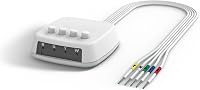
The ecobee Power Extender Kit (PEK) is an option when a compatible 24 VAC system lacks a C-wire. Confirm that your setup supports it before buying; Enhanced includes the kit, while Essential requires a separate purchase.
On this page (9 sections)
- When do you need the ecobee Power Extender Kit?
- What does the PEK do, and what can't it solve?
- Which systems can use the ecobee PEK?
- Which ecobee thermostat or kit should you buy?
- What should you check before installation?
- How should you approach PEK setup?
- Which common mistakes should you avoid?
- What care does the kit need after installation?
- Should you choose the ecobee Power Extender Kit?
The ecobee Power Extender Kit (PEK) can help you install an ecobee thermostat when a compatible 24 VAC system has no C-wire connection. You need to confirm both the equipment and the wiring before choosing it.
Start with that check, then decide whether to buy a thermostat with the kit included or order the accessory separately. A missing wire at the wall is only one part of the decision.
When do you need the ecobee Power Extender Kit?
You may need the PEK when your chosen ecobee thermostat supports your HVAC system, but there is no usable C-wire connection. If a suitable C-wire is already connected, you generally don't need an adapter just because you're replacing the thermostat.
A C-wire, also called a common wire, helps complete the low-voltage power circuit that a wired smart thermostat uses. A thermostat cable can also contain unused conductors, so an empty C terminal doesn't prove that a new cable or adapter is necessary.
Have any spare conductor checked at both ends before treating it as an available C-wire. Wire color alone can't establish where it connects or what it does.
Use ecobee's thermostat compatibility tool with your actual terminal labels. Our guide to whether a smart thermostat needs a C-wire explains why the power connection matters.
What does the PEK do, and what can't it solve?
The PEK provides a C-wire solution for supported ecobee installations using the existing thermostat wiring. It doesn't make every heating system compatible with a smart thermostat.
Think of it as an installation accessory, rather than a thermostat upgrade. It doesn't add room sensing, change your heating equipment, or solve a wiring fault.
It's made for ecobee Smart Thermostat models, so don't buy it as a general adapter for another brand. Match the accessory to the thermostat you plan to install.
For the broader choice between an adapter and other wiring options, read what a C-wire adapter does. The useful question is which power arrangement your exact system supports.
Which systems can use the ecobee PEK?
The ecobee PEK works with 24 VAC systems only, and that voltage is a starting requirement rather than complete approval. It excludes millivolt, high voltage, dual transformer, fan coil, and communicating units.
Don't infer compatibility from the age of your home, the number of wires, or the fact that the old thermostat works. Different equipment can use similar-looking cables.
Identify the furnace, air handler, boiler, or other equipment from its documentation. If you have separate heating and cooling equipment, make sure the compatibility check accounts for the whole setup.
A thermostat's compatibility and the PEK's compatibility are separate checks. A thermostat may support an equipment type without making the PEK suitable for that installation.
If you're comparing brands, our smart thermostat compatibility checker guide explains what to gather before choosing. Keep equipment model numbers and clear wiring photos together so you don't have to inspect the system twice.
Which ecobee thermostat or kit should you buy?
Choose Enhanced for an included PEK, Essential for its simpler feature set, or the standalone kit when you already know which compatible thermostat needs it. Compare the full installation, including accessories, rather than choosing by the thermostat alone.
Enhanced: an ecobee Power Extender Kit included
The ecobee Smart Thermostat Enhanced suits someone replacing a thermostat who wants the PEK and trim kit in the same box. It also offers built-in occupancy sensing, humidity adjustments, and control through the ecobee app.
Its occupancy features make it a useful choice when people come and go at different times. It supports Alexa, Google Assistant, Apple HomeKit, and SmartThings, while optional SmartSensors can help prioritize occupied rooms.
Skip Enhanced if you already have a suitable thermostat and only need an adapter. If your routine is predictable and you mainly want scheduled temperature changes, compare Essential before paying for features you may leave unused.
Essential: for schedules and app control
The ecobee Smart Thermostat Essential suits buyers who want a color touchscreen, app control, and temperature changes based on a set schedule. It supports Apple HomeKit, Google Assistant, and Alexa.
Budget for the PEK if your confirmed installation needs one, and a trim kit if you want to cover marks around the old thermostat. Both accessories are sold separately for Essential.
Skip this route if you want built-in occupancy sensing or prefer the included accessories with Enhanced. Our ecobee Essential vs Enhanced comparison helps you decide whether those differences matter in daily use.
Standalone PEK: for a confirmed accessory need
The separate ecobee Power Extender Kit suits an Essential buyer whose compatible system needs the adapter. It also makes sense when you have a supported ecobee thermostat but no usable kit available.
Skip the separate purchase if the thermostat you're buying already includes the kit. ecobee excludes Essential and Lite from the models that come with one.
Don't buy it speculatively because you see an empty terminal. Resolve the wiring question first, especially if you have an unused conductor or equipment that falls outside the PEK's supported systems.
What should you check before installation?
Gather terminal labels, equipment details, and the correct instructions before disconnecting anything. This gives you a clear record of the starting setup and helps you catch a mismatch early.
- Identify the exact ecobee model and check the box contents.
- Record the HVAC equipment model numbers and system type.
- Follow the equipment instructions to disconnect power before inspecting wiring.
- Photograph the thermostat connections and label wires by their terminal names.
- Check compatibility and read the installation instructions for your setup.
Don't rely on a generic online wiring diagram when your connections differ. For background on terminal names, see our guide to C-wires and thermostat wiring.
Decide who will do the work before buying accessories. If you rent, can't access the equipment, or can't identify the control connections, arrange permission or qualified help before removing wires.
How should you approach PEK setup?
Follow ecobee's instructions for your exact wiring arrangement, including the connections at the HVAC equipment and thermostat. Scan the QR code on the standalone kit's box to open its installation guide.
A PEK installation can involve the equipment control board, so the work may extend beyond the wall plate. Allow time to identify connections, route wires neatly, and close equipment panels properly.
Keep your original photos available throughout the job. If a terminal label, extra wire, or connection doesn't match the instructions, pause and have the difference resolved before restoring power.
Once installation is complete, follow the thermostat's setup prompts and check the heating, cooling, and fan functions your system supports. Unexpected operation, a blank screen, or a wiring warning calls for a connection review before changing comfort schedules.
Which common mistakes should you avoid?
Avoid guessing from wire colors or treating every missing C-wire the same way. Correct terminal identification matters more than the color of the insulation.
Don't assume that selecting “off” on the old thermostat disconnects electrical power. Use the equipment's power-disconnection instructions before working on connections.
Another mistake is buying Essential without counting the accessories the installation needs. Compare the thermostat, adapter, trim needs, and any professional work as one project.
Keep the power choice separate from the comfort choice. Optional room sensors may help with how the thermostat responds to different rooms, but they don't replace a required power connection.
If the wiring check rules out your preferred model, return to our wiring-first guide to smart thermostats before choosing a replacement. Changing the thermostat model may make more sense than trying to force an unsupported adapter setup.
What care does the kit need after installation?
After installation, focus on normal thermostat operation and a clear wiring record. There's no comfort setting on the PEK that you need to adjust with each season.
Save the installation guide, equipment details, and final connection photos. Those records help if a technician replaces equipment or you change thermostats later.
Keep access to the HVAC equipment clear and follow its maintenance instructions. Leave the electrical connections alone during routine thermostat cleaning or schedule changes.
If power interruptions or unusual system behavior start after later HVAC work, tell the technician that a PEK is installed. Don't assume an app setting will correct a changed connection.
Should you choose the ecobee Power Extender Kit?
Choose the ecobee Power Extender Kit only after confirming that your thermostat needs it and your system supports it. Choose Enhanced if its occupancy features and included accessories fit your needs; choose Essential if schedule-based control suits you and you've accounted for the separate kit.
If you already have a working C-wire connection, put your attention on the thermostat features you'll use. If the PEK is incompatible, have the wiring options assessed before ordering anything.
Your next step is to record your actual connections and review thermostat C-wire options. That turns “I have no C-wire” into a specific installation plan.
Frequently asked questions
Does the ecobee Power Extender Kit replace a C-wire?
The PEK offers a way to install a compatible ecobee thermostat when there is no C-wire connection. It doesn't add a new wire through your wall or make an unsupported HVAC system compatible, so confirm your equipment and wiring with ecobee's compatibility tool before choosing it.
Does ecobee Smart Thermostat Enhanced include a PEK?
Yes, ecobee Smart Thermostat Enhanced includes a Power Extender Kit, along with a trim kit. You don't need to order another PEK for a new installation if the included one suits your setup, but you still need to confirm that your HVAC system supports its use.
Does ecobee Smart Thermostat Essential include a PEK?
No, ecobee Smart Thermostat Essential requires a separately purchased Power Extender Kit when your installation needs one. Check compatibility before ordering both items, and include any trim kit you want in your comparison because Essential also sells that accessory separately, while Enhanced includes it.
Can you use an ecobee PEK with any heating system?
No, the ecobee PEK works only with compatible 24 VAC systems. It excludes millivolt, high voltage, dual transformer, fan coil, and communicating units, so a missing C-wire alone doesn't establish compatibility; identify your equipment and follow ecobee's guidance for the exact thermostat and wiring combination.