7 Best Smart Thermostats for Alexa (October 2026)
The best smart thermostats that work with Alexa include the ecobee Smart Thermostat Premium for direct voice control, the Sensi ST55 Smart Thermostat for button-first households, and the ecobee Smart Thermostat Enhanced for changing home routines.
On this page (7 sections)
- Which is the best smart thermostat for Alexa in your home?
- What should you check before choosing an Alexa thermostat?
- How should you set up an Alexa thermostat?
- How do you get useful room readings and reliable daily control?
- Can an Alexa thermostat reduce energy use?
- What mistakes should you avoid with an Alexa thermostat?
- Which Alexa thermostat should you choose?
The ecobee Smart Thermostat Premium is the best smart thermostat for Alexa if you want to speak directly to the thermostat and use a room sensor from day one. Choose Sensi ST55 for familiar buttons, or Amazon Smart Thermostat if your household already manages home devices through Alexa.
Start with your heating system, then choose how you want to control it. A built-in speaker, an Alexa connection and a room sensor solve different problems.
Our wiring-first guide to the best smart thermostats covers broader system needs. For more detail on the Amazon Smart Thermostat or ecobee Premium, read their individual reviews.
Our picks at a glance
-
1

-
2

-
3

- 4
 Check it
ecobee Smart Thermostat Essential
Best for steady daily schedules - 5
 Best for Alexa-centered homesCheck it
 - 6
 Check it
Honeywell Home T9 Smart Thermostat
Best for multi-room households - 7
 Check it
Sensi Lite ST25 Smart Thermostat
Best for privacy-minded app users
Which is the best smart thermostat for Alexa in your home?
Choose Premium for direct voice control, ST55 for buttons, or Enhanced for occupancy-based adjustments. The remaining picks suit predictable schedules, Alexa-centered homes, multi-room comfort or app users with privacy concerns.
We compared controls, included accessories, power options and comfort features. Product order reflects overall fit for this search, but a lower pick can be the better choice for your wiring or household.
| Product | Best for | Voice control | Room sensor | C-wire option | Our score |
|---|---|---|---|---|---|
| ecobee Smart Thermostat Premium | direct voice control | Alexa built in; Siri requires an Apple home hub | SmartSensor included | Power Extender Kit included | 9.0 |
| Sensi ST55 Smart Thermostat | button-first households | Works with Alexa | Not required in most applications | 8.6 | |
| ecobee Smart Thermostat Enhanced | changing home routines | Works with Alexa | SmartSensors sold separately | Power Extender Kit included | 8.5 |
| ecobee Smart Thermostat Essential | steady daily schedules | Works with Alexa | SmartSensor sold separately | Power Extender Kit sold separately | 8.2 |
| Amazon Smart Thermostat | Alexa-centered homes | 7.5 | |||
| Honeywell Home T9 Smart Thermostat | multi-room households | Works with Alexa and Google Assistant | Smart Room Sensors sold separately | C-wire required; power adapter included | 7.4 |
| Sensi Lite ST25 Smart Thermostat | privacy-minded app users | Works with Alexa | Not required in most homes; some systems need one or a compatible power accessory | 7.3 |
ecobee Smart Thermostat Premium
- Alexa built in
- Included SmartSensor
- Power Extender Kit included
- Air quality monitor
Speak directly to the thermostat and use its included SmartSensor to guide comfort from a room you actually use. It suits buyers who want both features from the start.
Pros
- Built-in Alexa speaker
- SmartSensor included
- Power Extender Kit included
Cons
- Extra speaker functions may duplicate an existing Alexa setup
- Smoke alarm sound alerts require a subscription
Choose the Premium if a speaker at the thermostat and an included room sensor both fill a need. Its SmartSensor lets a bedroom or living area help guide comfort instead of leaving every decision to the hallway temperature.
Alexa is built into the thermostat's speaker, which also supports Spotify playlists and podcasts. Siri requires an Apple home hub, so switching voice assistants involves a different setup.
The air quality monitor adds alerts and furnace-filter reminders. An ecobee Smart Doorbell Camera can also provide a front-door view and two-way talk at the thermostat; smoke alarm sound alerts require an ecobee Smart Security subscription.
Premium includes a Power Extender Kit for compatible systems without a C-wire. ecobee states 95% HVAC compatibility, but your equipment still needs a check through its thermostat compatibility checker.
Skip Premium if you already have voice coverage and only need scheduled temperature changes. Its extra functions are useful when you'll use them, rather than reasons to replace a simpler suitable model.
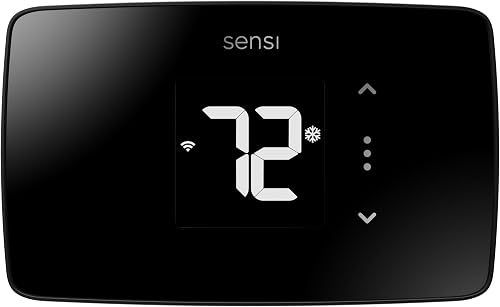
Sensi ST55 Smart Thermostat
- Works with Alexa
- Physical buttons
- Flexible scheduling
- Equipment and filter reminders
Physical buttons keep everyday adjustments familiar, while Alexa support and remote access add smart control. Its traditional shape can also help cover the space left by an older thermostat.
Pros
- Physical buttons
- Usage reports and maintenance reminders
- Sensi says it does not sell personal information
Cons
- C-wire needs depend on the system
- Not a touchscreen model
Choose the ST55 for a household that prefers physical buttons. It keeps wall adjustments familiar while adding flexible scheduling, remote access and Alexa support.
That matters when several people share control. A family member or guest can change the temperature at the wall without learning a touchscreen menu or asking someone else to open an app.
Its shape is designed to fit the space of a traditional thermostat, which can help avoid exposed paint or mounting marks. Measure the old footprint before assuming the replacement will cover everything.
Sensi says a C-wire is not required in most applications. Its built-in level and step-by-step app instructions help with installation, but equipment compatibility still comes first.
Usage reports, equipment alerts and filter reminders suit buyers who want help keeping track of HVAC care. Sensi also says it won't sell personal information to third parties.
Skip the ST55 if your main goal is a touchscreen or the Premium's built-in speaker. Its appeal is straightforward daily control.
ecobee Smart Thermostat Enhanced
- Works with Alexa
- Built-in occupancy sensing
- Power Extender Kit included
- Optional SmartSensors
Occupancy sensing helps it respond when your household's day changes. Choose it for automatic comfort adjustments and Alexa support, with room sensors available as a later addition.
Pros
- Built-in occupancy sensing
- Power Extender Kit included
- Supports several smart home platforms
Cons
- SmartSensors sold separately
- Requires an HVAC compatibility check
Choose Enhanced if your household's schedule changes and you want occupancy sensing to help manage comfort. It can adjust for whether people are home and supports preheating or precooling before arrival.
It also learns temperature preferences and schedules, with humidity adjustments that help guide comfort. These functions suit a household that wants fewer manual changes as work hours or home activity shift.
Enhanced works with Alexa, Google Assistant, Apple HomeKit and SmartThings. That gives it a role in homes using several platforms, without making a speaker on the thermostat the reason to buy.
A Power Extender Kit is included, while SmartSensors are separate. You can begin with the thermostat and add room sensing later if the wall location proves a poor guide to comfort elsewhere.
ecobee states 90% HVAC compatibility. Skip Enhanced if a predictable schedule meets your needs, or compare the full accessory package with Premium if you already know you want a room sensor.
ecobee Smart Thermostat Essential
- Works with Alexa
- Color touchscreen
- Schedule-based adjustments
- Optional Power Extender Kit
A color touchscreen, app access and scheduled adjustments cover a predictable household routine. Check accessory needs before choosing it over an ecobee model with more equipment included.
Pros
- Color touchscreen
- Schedule-based temperature control
- Supports Alexa and other major platforms
Cons
- Power Extender Kit sold separately
- SmartSensor sold separately
Choose Essential if your days follow a steady pattern and you want Alexa support with a color touchscreen. Its scheduled adjustments fit households with regular work, sleep and away times.
App access lets you change the plan when needed. Indoor humidity detection, a schedule assistant and time-of-use features add options beyond a basic wall schedule.
Time-of-use control is most relevant when your electricity plan charges different rates at different hours. Check your actual plan before allowing rate-based changes to influence comfort.
The Power Extender Kit, trim kit and SmartSensors are sold separately. If you need several extras immediately, compare the complete setup with another ecobee tier rather than choosing the thermostat alone.
ecobee states 85% system compatibility and support for specified 24 VAC equipment. Skip Essential if your equipment falls outside its supported configuration or you want Enhanced's built-in occupancy sensing.
Our ecobee Essential, Enhanced and Premium comparison helps you choose the tier around the functions you'll use.
Amazon Smart Thermostat
- Alexa app control
- Home, away and sleep schedules
- Alexa+ automatic control
- Select Alexa device integration
Manage schedules and temperature in the Alexa app, with select Alexa devices available to guide room comfort. It fits households that already organize home control around Alexa.
Pros
- Control through the Alexa app
- App-guided installation
- Can use select Alexa devices for room readings
Cons
- Automatic temperature control uses Alexa+ advanced features
- Room features require compatible Alexa devices
Choose Amazon Smart Thermostat if the Alexa app is already your household's home-control hub. It puts temperature control alongside the devices and routines you already manage there.
You can create home, away and sleep schedules. Automatic temperature control uses Alexa+ advanced features, so separate the schedule you set yourself from the added automation you expect Alexa to handle.
Select Alexa devices can supply temperature readings or presence detection to guide heating and cooling. Check your exact device models before counting existing speakers or displays as part of the thermostat setup.
That distinction matters if you want a bedroom reading. Owning an Alexa device does not, by itself, confirm that it can provide the room input you need.
The Alexa app guides installation, but confirm equipment and power requirements before removing the old thermostat. Skip this model if you want to speak directly to a thermostat with an integrated Alexa speaker, or prefer to choose around another smart home platform.
Honeywell Home T9 Smart Thermostat
- Works with Alexa
- Optional Smart Room Sensors
- Geofencing
- Filter and temperature alerts
Optional Smart Room Sensors let the T9 focus on multiple rooms, while geofencing supports home and away adjustments. Check its power requirements carefully, especially with oil heating.
Pros
- Optional multi-room focus
- Monthly Energy Report
- Filter and temperature alerts
Cons
- Room sensors sold separately
- Does not support electric baseboard heat
Choose the T9 if readings from several rooms matter more than the hallway alone. Optional Smart Room Sensors support multi-room focus, which suits households that use different living areas throughout the day.
Plan the sensor locations before buying them. A bedroom and home office may be useful choices, but a rarely used room should not dictate comfort simply because it is the warmest or coldest.
The T9 also offers geofencing, a Monthly Energy Report, and filter and temperature alerts. Its Smart Response feature learns heating and cooling patterns to help reach the desired temperature at the right time.
Honeywell Home specifies a C-wire requirement and an included power adapter. Confirm the correct power arrangement for your system, especially with heating-only oil equipment, which requires a C-wire.
Supported equipment includes forced air, hot water, steam and heat pumps with electric backup. Skip it for 120–240 V electric baseboard heat, or if you want room sensing without buying separate sensors.
Sensi Lite ST25 Smart Thermostat
- Works with Alexa
- Remote app control
- Geofencing
- Flexible scheduling
App control, geofencing and schedules suit buyers who want straightforward remote adjustments. Sensi says it does not use thermostat activity for targeted advertising.
Pros
- Remote app control
- Geofencing and usage reports
- Clear privacy commitments from Sensi
Cons
- Some systems need a C-wire or compatible power accessory
- Requires a 2.4 GHz Wi-Fi connection
Choose Sensi Lite if you prefer app control and value clear privacy commitments. Sensi says it won't sell personal information or use thermostat activity for targeted advertising.
Flexible scheduling covers regular days, while geofencing can help with changes in who is home. Usage reports let you review HVAC activity rather than relying on memory after a busy week.
The ST25 needs a 2.4 GHz Wi-Fi connection. Confirm your router provides that network and that your phone can complete setup on it before installation day.
Sensi says a C-wire is unnecessary in most homes, but heating-only, cooling-only and heat pump systems may need one or a compatible power accessory. Treat that exception as an early buying check.
A built-in level and step-by-step instructions help with mounting. Skip Sensi Lite if you want the ST55's physical-button layout, or if a direct voice interface at the thermostat is the main reason you're upgrading.
What should you check before choosing an Alexa thermostat?
Confirm equipment compatibility, power and your preferred control method before comparing extras. These checks prevent buying a thermostat that connects to Alexa but cannot run your system correctly.
Does the best Alexa smart thermostat need a built-in speaker?
Only if you want to speak directly to the thermostat. A model that works with Alexa can still meet your needs through a compatible Alexa setup without adding another speaker at the wall.
Think about where the thermostat sits. Direct voice control is less useful in a hallway you rarely pass than near a living area where you often make adjustments.
Also decide who needs access. Keep wall controls and the thermostat app usable for people who don't want to issue voice commands.
Will it work with your HVAC equipment and wiring?
Identify the equipment and terminal labels, rather than choosing by wire count or wire color. The same number of wires can serve different system types.
Record whether you have a furnace, boiler, heat pump, cooling equipment or backup heat. For heat pumps, confirm support for the reversing valve and the relevant heating stages.
A C-wire supplies continuous low-voltage power; an adapter is a system-specific way to provide a suitable power arrangement. An included adapter does not make every HVAC setup compatible.
Read our guide to smart thermostats without a C-wire if power is uncertain. For a heat pump, use these thermostat compatibility checks before choosing around Alexa features.
Do you need room sensing or separate temperature zones?
Room sensing changes which readings guide the system; zoning changes where heating or cooling goes. A sensor alone cannot make one shared HVAC zone hold separate temperatures in every room.
For example, prioritizing a warm upstairs bedroom may make a cooling system run longer. Downstairs rooms served by the same zone may become cooler as a result.
Choose sensor locations around occupied rooms and discuss the tradeoff with everyone at home. Persistent room differences may also need airflow, insulation or equipment attention.
Our guide to smart thermostats with room sensors explains the choices if room comfort is your main reason to upgrade.
Which controls will your household actually use?
Choose the daily interface first, then the extras. Buttons suit people who want a quick wall adjustment; app access helps when you're away; voice control helps when reaching the wall is inconvenient.
A thermostat can have several control methods, but everyone should know the basic routine. Agree on normal temperatures and how long a manual change should last.
If you already use several smart home platforms, check support for each one you intend to keep. Avoid adding a second platform solely for a feature you may rarely use.
How should you set up an Alexa thermostat?
Complete the HVAC setup before linking Alexa or adding routines. This makes it easier to separate a wiring or equipment problem from an account or voice-control problem.
Prepare before removing the old thermostat
Turn off power to the heating and cooling equipment at the appropriate breaker or disconnect. Photograph the existing terminal connections and label each wire by its terminal before loosening it.
Secure the wires so they cannot slip into the wall. Keep the old thermostat and its parts until the replacement is working correctly.
Follow the new thermostat's instructions for jumper wires and power adapters. Do not copy the old connections blindly or work inside equipment you cannot identify safely.
If the wiring differs from the instructions, stop and get qualified help. Our guide to smart thermostat installation costs and hiring help explains when professional installation makes sense.
Configure the system before adding voice control
Enter the correct equipment type, fuel type and supported stages during setup. A heat pump configured as conventional heat can behave incorrectly even when the screen and app appear normal.
Follow the manufacturer's startup checks and allow any required compressor delay. Confirm that a normal heating or cooling call produces the expected response.
Then connect the thermostat account through the current Alexa setup process. Give the device a clear name, especially if you have more than one thermostat or HVAC zone.
Try a specific command such as “set the downstairs thermostat to 72 degrees.” Distinct names reduce confusion between a thermostat, a room group and another device.
Start with one schedule and one automation
Use a simple schedule first, then add automation after you understand the normal pattern. Begin with realistic home, sleep and away settings.
Avoid letting several apps or routines change the same setting at similar times. A thermostat schedule, location rule and Alexa routine can otherwise appear to undo one another.
Check what happens after a manual adjustment. A temporary change that ends at the next scheduled period behaves differently from a hold that remains active.
How do you get useful room readings and reliable daily control?
Place sensors carefully and make small, deliberate changes. More sensors or more routines will not help if they respond to misleading readings or conflicting settings.
Put room sensors where people spend time
Place a sensor according to its instructions in a room whose comfort matters. Keep it away from direct sun, supply vents, exterior doors and heat from electronics.
A sunny windowsill or a shelf above a television can make a room seem warmer than the space people occupy. Likewise, a rarely used drafty corner may drive unnecessary heating.
Review which rooms influence daytime and nighttime comfort. A home office may deserve attention during work hours, while the bedroom matters more during sleep.
Make temperature changes that match your equipment
Use small adjustments when comfort is close to right. Setting a much more extreme target generally does not make ordinary heating or cooling reach your preferred temperature faster.
Heat pumps need particular care with large heating setbacks because recovery can involve backup heat. Follow equipment guidance rather than copying another household's schedule.
Give a change time to take effect before making another. Frequent overrides make it harder to see whether the schedule or room priority needs attention.
Keep controls and maintenance routines clear
Clean the thermostat's exterior gently according to its care instructions. Keep liquids away from openings, and don't paint over or cover the thermostat.
Respond to filter reminders using the correct filter and replacement guidance for your HVAC equipment. A reminder is a prompt to check, rather than proof that a filter has reached the end of its useful life.
After changing your router, Wi-Fi password or account settings, confirm remote control and Alexa access. Before travel, check the away schedule and avoid settings that could expose the home to freezing or excessive heat.
Can an Alexa thermostat reduce energy use?
It can help when it changes wasteful heating and cooling habits. Voice control alone does not save energy, and a well-managed existing schedule may leave less room for improvement.
Useful changes include reducing conditioning during suitable away periods and avoiding forgotten manual holds. The right settings depend on occupancy, weather, insulation and the HVAC system.
Don't compare manufacturer savings percentages as though they measure the same household. Different baselines and usage patterns can produce very different results.
Review usage reports over meaningful periods and account for weather changes. Less runtime during a mild week does not prove the thermostat caused the reduction.
Read whether a smart thermostat can save money for a fuller explanation. Check your utility's smart thermostat rebate requirements before buying, including eligible models and any enrollment terms.
What mistakes should you avoid with an Alexa thermostat?
Avoid assumptions about compatibility, accessories and automation. Most buying mistakes start with expecting a feature to work before confirming what the complete setup needs.
- Choosing voice features before wiring. A suitable Alexa connection cannot compensate for unsupported HVAC equipment.
- Assuming every Alexa device supplies room readings. Confirm the exact device support before planning sensor coverage.
- Forgetting separate accessories. Include the required power adapter, trim solution and room sensors in your decision.
- Expecting independent room temperatures. Sensors guide a shared system unless the HVAC equipment provides separate zones.
- Leaving an indefinite hold active. Check whether a manual change resumes the schedule when you expect.
- Stacking overlapping routines. Give each automation a clear purpose and remove rules that compete.
- Using an unsuitable phone location rule. In a shared home, one person leaving should not automatically make occupied rooms uncomfortable.
Keep a simple note of your normal settings and account connections. That helps another household member restore the routine after a change without rebuilding the setup from memory.
Which Alexa thermostat should you choose?
Choose the best smart thermostat for Alexa around the job you need it to do. First rule out models that do not support your equipment, then compare the complete setup with any required accessories.
- Pick ecobee Premium for direct voice control and a room sensor from the start.
- Pick Sensi ST55 when familiar physical buttons matter most to the household.
- Pick ecobee Enhanced for occupancy-based comfort and a changing daily routine.
- Pick ecobee Essential for touchscreen control and a predictable schedule.
- Pick Amazon Smart Thermostat when Alexa is already the center of your home controls.
- Pick Honeywell Home T9 when you plan to use optional sensors across several rooms.
- Pick Sensi Lite ST25 for app-led control with Sensi's stated privacy protections.
Before ordering, write down your equipment type, terminal labels and accessory needs. Use the best smart thermostat guide if any of those checks remain unresolved.
Our top 3 picks at a glance
-
1
-
2
-
3
Frequently asked questions
Which smart thermostat has Alexa built in?
The ecobee Smart Thermostat Premium has Alexa built into its speaker, so you can speak directly to the thermostat. It also supports Spotify playlists and podcasts.
Choose it when a speaker at the thermostat's location would be useful; Alexa compatibility alone does not mean another thermostat has a built-in speaker.
Will an Alexa thermostat work without a C-wire?
Some models can, depending on your HVAC equipment and available wiring. The ecobee Premium and Enhanced include a Power Extender Kit for compatible systems, while Sensi supports operation without a C-wire in many applications.
Check the exact equipment requirements before assuming an adapter or battery will solve the power connection.
Can Alexa adjust the temperature in different rooms?
Room readings can guide the thermostat, but they do not create separate heating or cooling zones. A sensor in a bedroom may influence when a shared system runs, affecting other rooms too.
Independent room temperatures require suitable HVAC zoning or separate equipment, beyond simply adding Alexa control or a room sensor.
Do smart thermostats work with every heating system?
No, compatibility depends on the equipment, control wiring and power supply. Heat pumps, boilers and systems with backup heat need particular attention.
The Honeywell Home T9 does not support electric baseboard heat. Identify your equipment and use the manufacturer's compatibility guidance before choosing any thermostat from this roundup.


